Details
- Released
- 1990
- Developer
- BUG Multisystem Ltd.
- Publisher
- BUG Multisystem Ltd.
- Genre
- Action, Racing & Driving
- Players
- Up to 1; single player
- Type
- Commercial
- Platform
- MS-DOS
- Pack
- eXoDOS
- Manual
- Not included
Stories
No one has written about Moto Grand Prix yet.
Screenshots
About this game
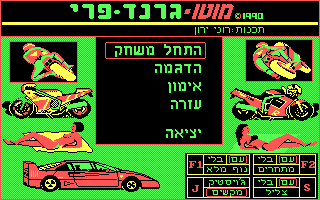
There is not so much text in this game, so the language barrier will definitely not prevent you from getting to know it. The main menu has five items: "התחל משחק" - "start a new game"; "הדגמה" - a non-interactive "demonstration" of the gameplay (it is also automatically launched in case of our short inactivity while on the described screen); "אימון" - "training"; "עזרה" - "help" (there, among other things, you can familiarize yourself with the control keys - but those that are offered are not recommended to be used); the lowest point, as you might guess, is responsible for the exit.
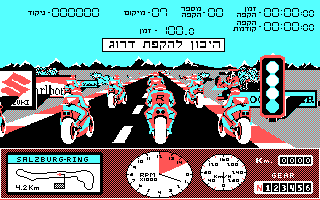
There are only two game modes directly, and each of them has three tracks to choose from (real ones, by the way) - Misano, Salzburgring and Laguna Seca (in the game, the names of the last two are for some reason written with a hyphen); all of them are circular and differ in length, the time it takes to get to the finish line, and the "bonus" ("בונוס") awarded for passing and measured in points. In both modes, you can freely select any of these routes; in "Training" it is allowed to ride on it endlessly, studying all its features, and in a "race" only one (!) round-trip is always assumed. The championship, apparently, is not provided at all.
The following keys are involved in the control: "4" and "6" on the numeric keypad - tilt the motorcycle body to the left and right, respectively; "5" - alignment of the body (you must use it); "F9" and "F10" - respectively braking and acceleration (to start moving, you need to press the last of the last pair of named buttons). Notice the presence of six "gears" represented by a scale of numbers from 1 to 6 in the lower right corner of the screen; after reaching the limit speed by holding "F10" on the first one, you need to continue to hold the named key to switch to the second, and so on.
Collections
- Vehicle
- Motorcycle